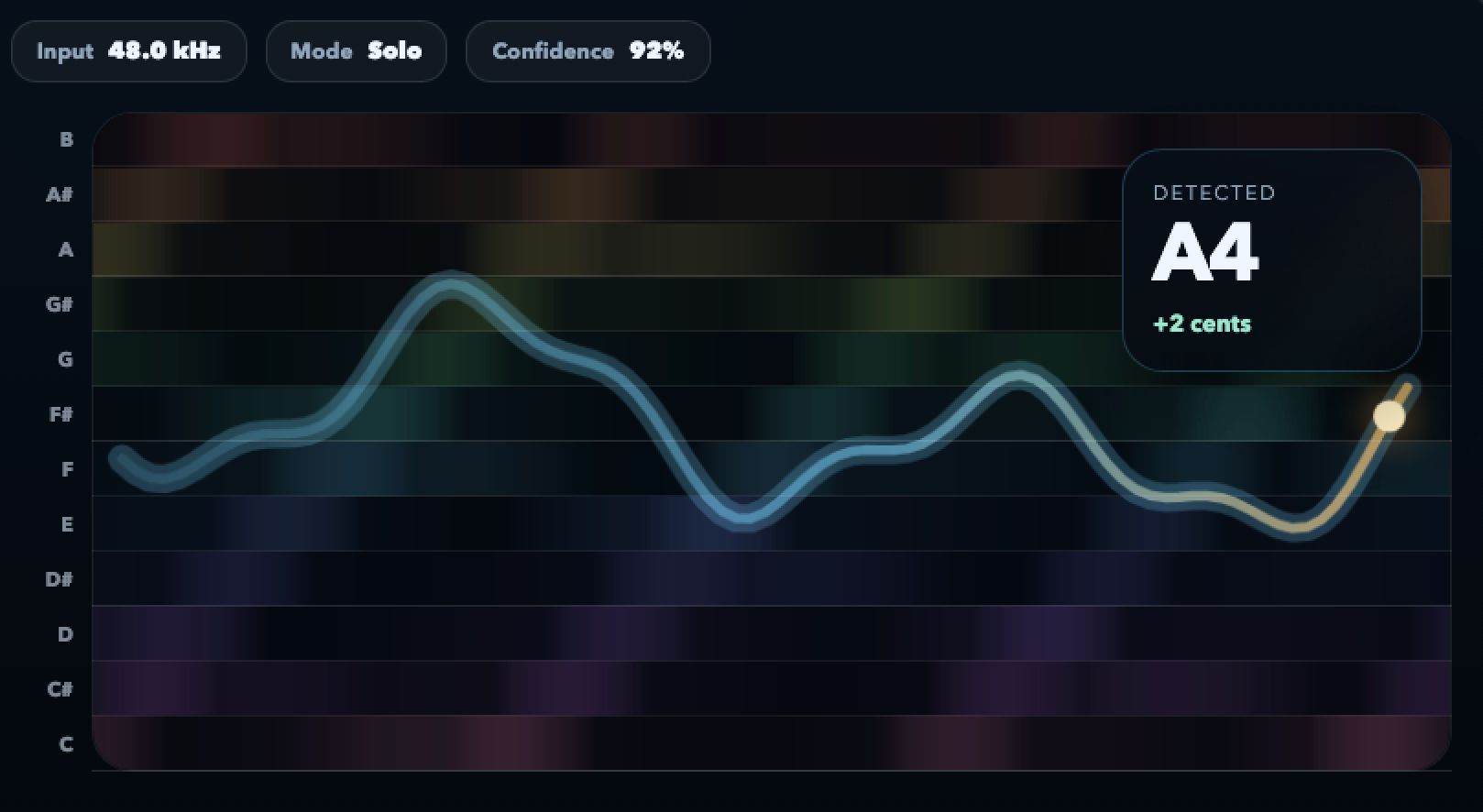
Take a baseline, change one thing, take a comparison. The loop is the unit, not the single attempt.
Intonation practice tool
Turn intonation into a problem you can actually solve
Most practice is opinion. Fiume gives you the one thing you are missing — a live picture of how each note behaved. Run a baseline, make one adjustment, run a comparison, and let the contour tell you whether the change worked.
Free in your browser. No sign-up. Audio stays on your device.
You see entry, center and release as one contour — exactly what you are trying to control in practice.
Quiet, dark-mode interface, no pop-ups, no sign-up gate. Your eyes can focus on the pitch line for an hour.
Audio is processed locally in the browser. Nothing about your practice leaves your device.
The practice loop
Three things most players never see in their own playing
Intonation problems rarely live in the middle of the note. They live at the edges — the way you approach a pitch, whether the center holds, and how cleanly you release. Those three things are what the contour exposes.
Approach
Did the note start under pitch and slide up, arrive already sharp, or land clean? Most “tuning” problems are actually approach problems and disappear once you can see them.
Center
Once the note is sounding, does the center hold steady or creep? Drift on long tones usually means air support, embouchure pressure or posture — all fixable once the drift is visible.
Release
The last 100 ms of a note is where bad habits hide. A release that scoops downward signals a different issue than one that pinches upward. The contour separates them for you.
Drills and sessions
Practice situations this tool was built for
These are the moments where a live contour changes the decision you make on the next repetition — not just confirms what you already heard.
-
Long-tone work Hold a pitch for eight to twelve seconds. Watch whether the center actually holds or drifts after the first breath pressure change.
-
Interval accuracy Play a target interval — a fifth, a minor sixth, a tritone. See if the top note lands clean or overshoots before settling into place.
-
Slow scales Play a scale at quarter tempo. Each step is its own micro-problem. The contour shows which two steps are your real weak points, not the ones you think.
-
Phrase loops Pick one difficult two-bar fragment. Run it five times in a row and compare the contours side by side. This is how you measure progress in a single session.
-
Teacher-student work Use one shared picture to discuss a student’s last attempt instead of describing it in words. The conversation gets twice as efficient.
-
Audition prep Run each excerpt as a take, not as endless practice. The contour forces you to commit, evaluate, and move on, which is what happens in the room.
How to use it
A three-step practice loop, repeated
This is the pattern that makes visual feedback useful instead of distracting. Keep sessions short, keep the problem specific, and let the contour be the judge.
-
1
Take a baseline
Play or sing the problem once without trying to fix anything. Look at the contour. Name what is actually happening — approach, center or release.
-
2
Make one change
Change exactly one thing — air speed, bow weight, vowel shape, finger placement. One variable at a time is the whole point of deliberate practice.
-
3
Take a comparison
Run it again. Compare the new contour to the baseline. If the change helped, lock it in. If it did not, revert and try a different variable.
FAQ
Common questions about intonation practice tools
Is visual feedback a crutch?
It can be if you stare at it during performance. In practice it is the opposite — it gives you objective evidence so you can trust your ears faster, then take the screen away.
How long should a session be?
Fifteen to thirty minutes of focused loop work is usually more useful than an hour of unfocused playing. The tool makes it easier to keep the focus narrow.
Does it work for singers?
Yes, especially for sustained vowels, interval drills and scoop work. Singers often find the release view the most useful because they can’t hear their own release clearly.
Can I use it with my teacher online?
Yes. Each side opens the tool locally and you compare contours over video. Both of you see the same pitch shape without re-uploading audio anywhere.
What about vibrato and ornamentation?
They show up as a shaped band around the center, not as a problem. You can see rate, width and symmetry, which is hard to judge by ear alone.
Do I need anything besides a microphone?
No. A laptop or phone mic is enough to start. A cardioid condenser in a quiet room gives a cleaner contour if you do longer comparison work.
Stop guessing. Start comparing takes.
Open the practice tool, pick one drill, run the loop, and let the contour do the judging for you.
Open the practice toolFree, private, no account needed.